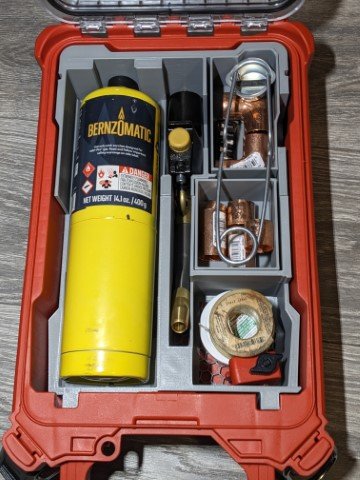
Securely store your Bernzomatic torch and cylinder in a custom Milwaukee PACKOUT Organizer insert designed for a precise fit and fast access.
Keep your torch setup protected, organized, and ready to use with this Milwaukee PACKOUT Organizer Insert for Bernzomatic Torch & Cylinder. Designed for a clean, secure fit inside your PACKOUT organizer, this insert helps prevent shifting during transport while keeping your Bernzomatic torch and cylinder easy to access on the job or in the shop. It is a practical storage solution for tradespeople, DIY users, and anyone who wants better tool organization without wasted space. Built for convenience and durability, this insert helps you keep your gear protected, neatly arranged, and ready when you need it.
- Fits: (PACKOUT 48-22-8435)
- Tool: DuraCast 4000 Torch Kit
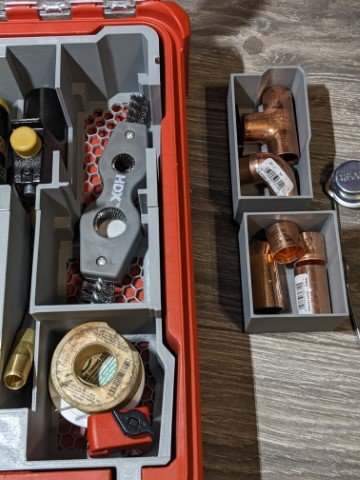
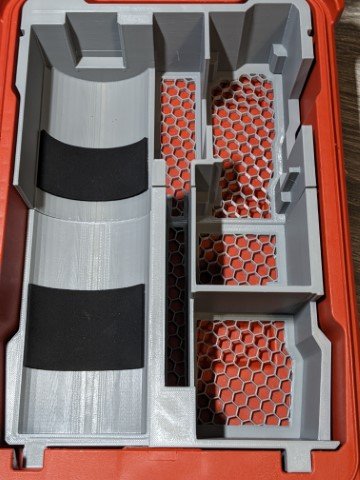
- Holds: Torch Cylinder (blue/yellow), Torch, Copper Fittings, Pipe Cleaner Brush, Flux, etc
- Material: PLA+
- Colors: Grey/Black/Red
Where to buy?
Currently our products are hosted on either eBay or Etsy, so you can securely buy them with your preference of which one suits your needs best.
If you need help with common questions, help installing, or troubleshoot common issues such as fitment here are some helpful resources below:
Will this fit my Packout box?
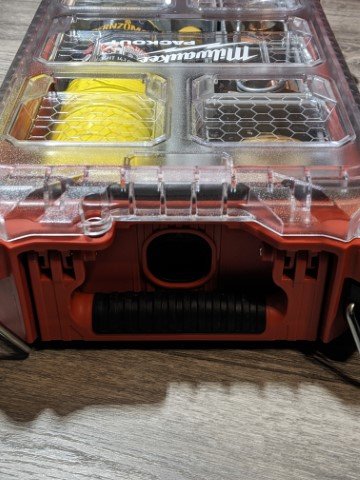
This insert is only compatible with the 5-compartment Deep Milwaukee Packout Organizer. It will not fit the shallow or compact versions.
Is the insert removable?
Yes, you can lift the insert out when needed. It is not permanently mounted.
What material is it made from?
The inserts are 3D printed using durable PLA+ and should hold up fine under normal use and conditions. Prolonged direct sunlight for many days at a time is not recommended as that can degrade the plastic over time. But normal use should not be a problem! Basically, don’t leave them outside in the sun unattended for an extended time (days).
How do I clean it?
Wipe with a damp cloth. Do not soak or use harsh chemicals, as they may degrade the print finish.
Before You Start:
- Make sure you have the 5-compartment Deep Milwaukee Packout Organizer.
- Unload any items from the organizer and wipe it clean of dust or debris.
1. Place the Inserts
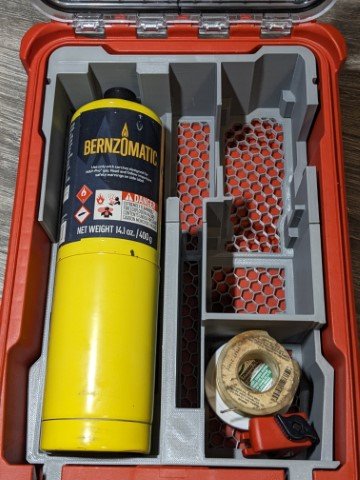
- Gently slide each insert into the appropriate compartment of the Packout Organizer, on the left side only.
- Start with the bottom insert and press it as far as you can against the bottom edge, then take the top insert and slide it down GENTLY and press down to set it into place. You may need to wiggle it a bit as it can be a tight fit as these inserts are precision-fit.
2. Load Your Cylinder
• Make sure your yellow/blue Bernzomatic cylinder is facing up (where the nozzle sits) and it will align with the notch cut-out in the top of the PACKOUT box. Gently lay it down onto the pre-installed foam padding.
3. Install Your Torch and Accessories
- Place your torch nozzle/tip side down (facing towards the handle of the PACKOUT box) and install it into the middle cut out. The nozzle/tip should be pointed out towards you not towards the bottom of the PACKOUT box.
- The bottom cutout to the right is for various tubing cutters or flux/resin.
- The larger cutout under the 2 trays are for a pipe cleaning brush or anything else that would fit in there.
- Finally, install the 2 trays into their respective cutouts and you can use those to store various fittings or anything else small to fit in there.
- If you use a striker, a standard sized striker can fit when you lay it across the trays.
4. Close and Test Fit
• Close the Packout lid gently and verify everything clears the lid.
• If anything protrudes, double-check they are fully seated.
Inserts fit too tightly, hard to install them into the PACKOUT box?
These are precision fit inserts so they can be a bit tight installing at first. What you want to do is place the bottom insert in first, and hold it firmly against the bottom of the box as you gently lay down the top insert. Place even pressure to ensure the inserts (top and bottom) lay flat against the bottom of the box and they should snap in.
The inserts were left in the sun or extreme heat and they look like they have warped a bit
Sun exposure is something these inserts are warned about when your item was shipped to you, with a giant sticker that warned to keep out of the sun or extreme heat. These inserts are printed in a way to help mitigate this from happening, but there are several ways it can warp, not all are bad or impedes functionality. For example, it may warp slightly on the bottom of the inserts, where there is a bit of a hollow gap in the way it prints, so if the bottom looks bubbly in a way, that’s not something that can impede functionality as its on the bottom and out of sight. However if a wall of the print looks warped and that is something visible and is causing the functionality to be impaired, that is another matter. For these issues, its best to email pictures of the warping to info@handy3dprint.com and see if there are any warranty options available. Typically the warranty policy is as long as you the buyer are OK with paying for shipping, then sending a replacement part is something that we can do. We are not a big store like amazon to afford free shipping so if you can cover the shipping label (under $10) then in most cases sending a replacement part isn’t a big deal.